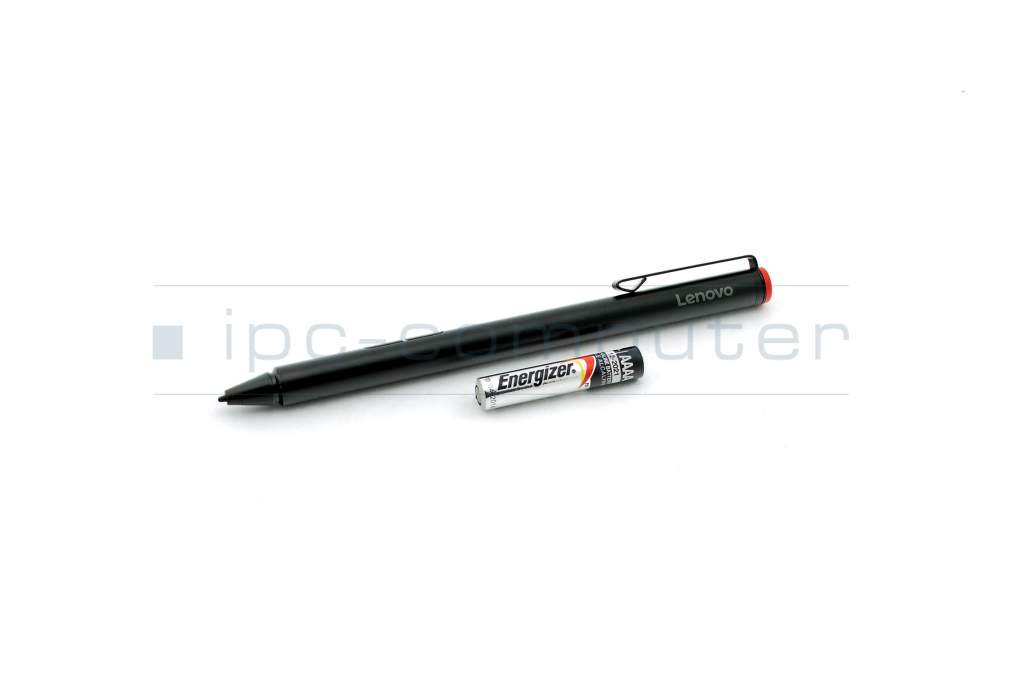
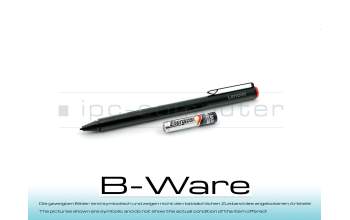
4X80H34887 original Lenovo Active Pen - Black (BULK) incl. battery

plus shipping charges
- Standardlieferung 20. October - 20. October
- Expresslieferung 20. October
- bei Bestellung innerhalb 23 hrs 13 min




Substitute part numbers:
00HN890, Medion 11051875, Medion 35042928, 4X80H34888, 5T70J33309, 5T70K13856, 5T70K13857, 5T70K13858, Medion DC470000200, Wacom ESP10110C5, Wacom ESP10112B5, Wacom ESP10114B5, GX80K32882, GX80K32883, GX80K32884 (0889955072467), GX80K32885, GX80L13424
Bulk - Original pen, including battery, in plain packaging. No other accessories included!
4X81C66286 original Lenovo Digital Pen 2 incl. batteries
plus shipping charges
5D10V82360 original Lenovo Mod Pen
plus shipping charges
PEN37R Stylus b-stock
plus shipping charges
4X81C66286 original Lenovo Digital Pen 2 incl. batteries
plus shipping charges
Product Info
- Manufacturer
- Lenovo
- Item Number
- 4X80H34887
- Sub-Partnumbers
- 00HN890, 11051875, 35042928, 4X80H34888, 5T70J33309, 5T70K13856, 5T70K13857, 5T70K13858, DC470000200, ESP10110C5, ESP10112B5, ESP10114B5, GX80K32882, GX80K32883, GX80K32884, GX80K32885, GX80L13424
- Safety information
- Sicherheits- & Herstellerkontakt-Informationen
Common data
- Condition
- New
- Color
- black
- Delivery includes
- 1x AAAA battery
Technical Data
- Pen protocol
- AES 1.0 Wacom
- Weight (g)
- 11 g
- Length (cm)
- 14.4 cm
- Diameter (mm)
- 9.8 mm
- Number of buttons
- 2
- Power supply
- Battery
- Operating system
- Windows 10 / Windows 11
Compatible with the following models:
Miix 510-12IKB (80XE)
Miix 510-12ISK (80U1)
Miix 520-12IKB (81CG)
Miix 700-12ISK (80QL)
Miix 710-12IKB (80W1)
Miix 720-12IKB (80VV)
The following models are only compatible if they are equipped with a touchscreen:
C340-14API (81N6)
C340-14IWL (81N4/81N5)
Flex 3 11IGL05 (82B2)
Flex 3 CB 11M735 (82HG)
Flex 5 14ALC05 (82HU)
Flex 5 14ARE05 (81X2)
Flex 5 14IIL05 (81X1)
Flex 5 14IIL05BR (81WS)
Flex 5 14ITL05 (82HS)
Flex 5 14ITL6BR (82LT)
Flex 5 15ALC05 (82HV)
Flex 5 15IIL05 (81X3/82HT)
FLEX 5-1470 (80XA/81C9)
FLEX 5-1570 (80XB/81CA)
FLEX 6-11IGM (81A7)
FLEX 6-14ARR (81HA)
FLEX 6-14IKB (81EM)
FLEX-14API (81SS)
FLEX-14IWL (81SQ)
FLEX-15IWL (81SR)
Lenovo MIIX 520-12IKB (20M3/20M4)
Lenovo Tablet 10 (20L3/20L4)
ThinkBook 13s Gen 4 ARB (21AS)
ThinkBook Plus G2 ITG (20WH)
ThinkPad X1 Tablet Gen 3 (20KJ/20KK)
X1 Extreme Gen 2 (20QV/20QW)
X1 Extreme Gen 3 (20TK/20TL)
X1 Extreme Gen 4 (20Y5/20Y6)
X1 Extreme (20MF/20MG)
X1 Tablet Gen 2 (20JB/20JC)
X1 Titanium Yoga Gen 1 (20QA/20QB)
X1 Yoga 3rd Gen (20LD/20LE/20LF/20LG)
X1 Yoga 4th Gen (20QF/20QG/20SA/20SB)
X1 Yoga 5th Gen (20UB/20UC)
X1 Yoga Gen 6 (20XY/20Y0)
X13 Yoga Gen 1 (20SX/20SY)
X13 Yoga Gen 2 (20W8/20W9)
Yoga 530-14ARR (81H9)
Yoga 530-14IKB (81EK)
Yoga 6 13ALC6 (82ND)
Yoga 6 13ALC7 (82UD)
Yoga 720-12IKB (81B5)
Yoga 720-13IKB (80X6)
Yoga 720-13IKBR (81C3)
Yoga 720-15IKB (80X7)
Yoga 730-13IKB (81CT)
Yoga 730-13IWL (81JR)
Yoga 730-15IKB (81CU)
Yoga 730-15IWL (81JS)
Yoga 900s-12ISK (80ML)
Yoga 920-13IKB (80Y7/80Y8)
Yoga C640-13IML (81UE)
Yoga C640-13IMLLTE (81XL)
Yoga C740-14IML (81TC)
Yoga C740-15IML (81TD)
Yoga C930-13IKB (81C4/81EQ)
Yoga C940-14IIL (81Q9)
Yoga C940-15IRH (81TE)
Category
- Category
- Pens / Stylus
- Usage
- Laptop
- Excerpt of suitable models for P/N 4X80H34887
- Lenovo Yoga 520-14IKB (80X8/80YM) , Lenovo Flex 5-1570 (80XB/81CA) , Lenovo ThinkPad P50 (20EQ/20EN) , Lenovo ThinkPad S3 Yoga 14 (20DM) , Lenovo ThinkPad Yoga (20CD/20C0) , Lenovo IdeaPad Miix 710-12IKB Tablet (80W1) , Lenovo IdeaPad Miix 700-12ISK (80QL) , Lenovo IdeaPad Miix 720-12IKB (80VV) , Lenovo IdeaPad Miix 510-12IKB (80XE) , Lenovo IdeaPad Miix 510-12ISK (80U1)
You've found this article over a part number. We'll check if it's the correct sparepart for your machine. To do this, please insert the manufacturer and the name of the model in the order comment.
Videos & Contributions
Introduction - Lenovo Active Stylus Pen (GX80K32884)
The Lenovo stylus input pen can be used universally for many models of the X1 series as well as for many Lenovo tablets. Therefore, we would like to elaborate on this in this video.
Learn more >
How do styluses work and what should be considered?